Hey there, let’s cut to the chase – if you’ve ever stared at a tiny, hard-to-reach spot (think: a clogged drain behind your sink, a loose wire inside your car’s dashboard, or that weird crack in your wall you can’t spot from the surface) and thought, “I wish I could just see what’s going on there,” you’ve probably wondered about USB inspection cameras. As someone who’s been supplying these bad boys for a few years now, I get it – most people see that little USB cord and the tiny camera tip and go, “Cool, but how does this even work?” No confusing jargon, promise. Let’s break it down like I’m explaining it to my cousin who once tried to fix his bike with a butter knife. USB Inspection Camera
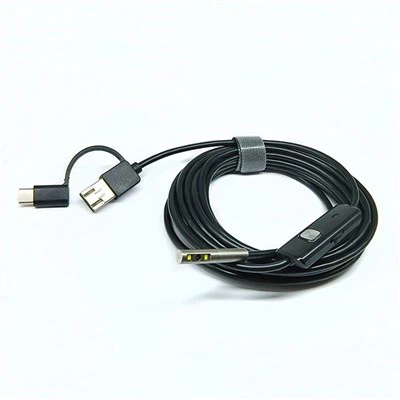
First off, let’s talk about the big-picture: this isn’t magic, it’s just a tiny, specialized camera paired with some clever tech that fits where your eyes can’t. The whole point of these cameras is portability, right? That’s why they plug straight into a USB port – whether it’s on your laptop, your phone, even a tablet. No fancy power cords, no bulky equipment. Just you, the camera, and whatever mess you’re digging into.
Let’s start with the core of the thing: the camera head. That tiny little tip (usually like 5.5mm to 8mm wide, about the size of a pencil eraser, for reference) isn’t just one lens – it’s a whole tiny setup. Let’s count the parts on that little guy: first, the image sensor. Wait, you know those sensors in your phone cameras? Same concept, but miniaturized to fit on a chip smaller than a grain of rice. It’s a CMOS sensor, by the way – most phone and webcams use these too, they’re low-power, which is perfect for this since we’re running off USB power. Unlike old CCD sensors, CMOS uses less juice, so it can run off your phone’s battery or a laptop’s USB port without needing a separate charger. That’s why these cameras are so portable.
Next, around that sensor? The lens. It’s not a regular lens – it’s designed for close-up, wide-angle viewing. Most of our inspection cameras have a 120-degree field of view, which means you can see a huge area right in front of the tip, not just a tiny sliver. That’s way better than a phone camera, which is made for distant stuff. The lens is also built to handle tight spaces – it’s durable, scratch-resistant, and sometimes even waterproof (if you get the semi-rigid or flexible cable models, those are great for drains).
Now, here’s the part most people don’t see: the lighting. You can’t see squat in a dark crevice, so every inspection camera has built-in LED lights right around the lens. How many? Usually 4 to 6 small LEDs, usually adjustable brightness too – super handy. If you’re in a super dark space, crank ‘em up, if you’re in a tight spot where glare would mess up the image, dim ‘em a bit. The LEDs are low-heat too, so they won’t burn whatever you’re checking out – that’s important if you’re looking at wiring or even small parts where heat could cause damage.
Okay, so the sensor captures the image, the lens focuses it, the LEDs light the scene – but how does that image get from the tiny chip on the camera head to your phone or laptop? That’s where the cable and the USB part come in. The cable isn’t just a plain old wire – inside it, there are tiny data wires that transmit the video feed from the sensor straight to your device. Most of our cables are either flexible (great for bending around corners) or semi-rigid (they hold their shape so you can snake ‘em through holes or pipes). We don’t use super thick cables because we want them to fit into small spaces – usually the cables are 1m to 10m long, so you can reach pretty far without having to squeeze the whole device in.
Wait, and USB itself – that’s the bridge between the camera and your device. When you plug the camera into a USB port (whether it’s USB-A for laptops or USB-C for newer phones/tablets), the device recognizes it as a “video input device” – like a webcam, basically. That means you don’t need to download weird, complicated software most of the time. A lot of our cameras work with free apps you can get from the App Store or Google Play, or even just the built-in camera app on your laptop. That’s why they’re so easy to use – no tech degree required.
But hold on, there’s more to it than just transmitting the video. The tiny chip in the camera head (called a controller chip) processes the image right there, so by the time it gets to your device, it’s already adjusted for brightness and focus. Some of our higher-end models even have a function where you can take snapshots or record video right from your phone, so you can save what you see for later – like if you’re a plumber finding a clog, or a mechanic checking a wiring issue, you can show your client or colleague exactly what you’re seeing.
Let’s talk about some real-world examples to make this concrete. Last month, we had a customer who was a homeowner with a clogged pipe under his bathroom sink. He couldn’t tell if the clog was just a hairball or something harder, so he grabbed our 2m flexible USB inspection camera, plugged it into his Android phone, and snaked the camera down the drain. The LED lights lit up the pipe, the wide-angle lens showed him a perfect view of the clog – it was just a bunch of hair and a toy car part his kid dropped a while back. He was able to use a drain snake to pull it out, no need to call a plumber. That’s the power of this tech.
Another customer is a small auto mechanic – he uses our semi-rigid camera to check under dashboards for loose wiring, or look inside engine parts where he can’t reach with his hands. The cable holds its shape, so he can bend it around corners, and the adjustable LEDs mean he doesn’t get glare off metal parts. He can record videos of wiring issues to show the car owners, which helps them understand why the repair is needed – way better than just saying “there’s a loose wire up there.”
Now, let’s address some common questions people have. First, do these cameras have a battery? Wait, almost all of them are powered by the USB port, right? That means you don’t have to charge the camera separately – when it’s plugged into your phone or laptop, it’s running. The only time you might need extra power is if you’re using a really long cable (over 5m), but even then, a good USB port will handle it. Second, can they see in total darkness? Not pitch black, but the built-in LEDs are bright enough for most tight spaces – they’re not night-vision goggles, but for drains, walls, or small engine parts, they work great. Third, are they waterproof? Our flexible cable models are – the camera head and cable are sealed, so you can put them in water to check pools, drains, even under the hood of your car after it’s been running. Just don’t submerge the USB end, obviously, because that’s what plugs into your device.
Wait, there’s also a misconception that USB inspection cameras are only for professionals. Nope – a lot of our customers are regular homeowners doing DIY projects. If you’re hanging a new shelf and want to check if there’s a stud behind the drywall (wait, no, that’s stud finders, but close), or if you have a wall cavity that’s been making weird noises, you can snake the camera through an electrical outlet hole and see what’s in there. It’s a great tool for anyone who likes to fix things around the house, or just wants to avoid calling a plumber or mechanic for small issues.
Now, let’s get into a bit of the tech that makes the image quality good. The CMOS sensor we use in our cameras has a resolution of usually 720p or 1080p – yeah, not 4K, but that’s overkill for tight spaces. You don’t need super high resolution when you’re looking at a spot that’s only a few inches away. 720p is more than enough to see details like a loose screw or a clog, and it keeps the file size small so you can record videos without taking up too much space on your phone. The lens also has a built-in feature called depth of field – that means objects that are a few inches from the lens are in focus, which is exactly what you want when you’re in a tight space. You don’t have to adjust focus manually most of the time, the camera does it for you automatically.
Something we pride ourselves on is the durability of our cameras. We know people are going to bend the cable, drop it, maybe get it dirty, so we build them to handle that. The lens is encased in a hard, scratch-resistant plastic or metal, the cable is braided (not just plain rubber) so it doesn’t kink or break easily, and the USB end has a protective cover so you don’t damage the port when you plug it in. We’ve had customers tell us they’ve used their camera for years, and it still works like new – that’s important for a tool you’re going to use regularly.
Let’s talk about how to use one, just to make sure you don’t feel lost. Step 1: Pick the right camera for the job. Flexible cables for pipes or narrow, winding spaces, semi-rigid for holes where you want to hold the shape, longer cables for bigger areas. Step 2: Plug it into your phone or laptop. Step 3: Download the free app if needed (most work with multiple apps, but we recommend the ones we test here to get the best quality). Step 4: Turn on the camera app, adjust the LED brightness, and start snaking it into the space. If you get to a spot where you can’t see, slowly pull it back a bit – sometimes the angle is off. And if you have a tablet, the bigger screen makes it easier to see details, so that’s a good option for longer projects.
Wait, a common mistake people make is forcing the cable. If it won’t go into a space, don’t push it – you’ll kink or break the cable. Take it out, adjust the angle, and try again. Also, if you’re using it in a dirty space (like a drain), wipe the camera head down after use so the gunk doesn’t get on the lens and mess up future images. That’s basic maintenance, but it goes a long way to making your camera last.
Now, I think it’s clear that these USB inspection cameras are a perfect blend of tiny tech and practical design. They take all the stuff that makes regular cameras work (sensor, lens, light) and shrink it down to fit in a space smaller than your thumb, then pair it with USB to connect to the devices you already have. No extra gear, no complicated setup, just a tool that lets you see what’s hidden.
At the end of the day, the best part of what we do is help people solve small (and not so small) problems without paying a fortune for a professional. Whether you’re a homeowner trying to unclog a drain, a mechanic checking wiring, an electrician looking at behind a breaker box, or even a hobbyist exploring inside old electronics, a USB inspection camera is a game-changer. If you’ve been thinking about getting one, or if you need a bulk order for your business, I can tell you we have options for every need – from basic DIY models to more heavy-duty ones for professionals.

If you have questions, or you’re ready to talk about what you need, just reach out. We’re here to help you pick the right camera, walk you through how to use it, or answer any other questions you have about how these things work. No pushy sales stuff, just real people who know these cameras inside and out, because we supply them day in and day out. Don’t let hidden spots stay a mystery – grab a USB inspection camera, and see for yourself what’s been hiding in the dark.
USB Inspection Camera References
- CMOS vs. CCD: An Overview, Digital Trends (2022)
- How USB Webcams Work, HowStuffWorks (2021)
- Inspection Camera Technology for Industrial and Home Use, TechRepublic (2023)
- Basic Maintenance Tips for USB Inspection Cameras, Popular Mechanics (2022)
- Understanding Resolution in Small-Format Image Sensors, IEEE Transactions on Consumer Electronics (2020)
Shenzhen EZON Electronics Co., Ltd.
Shenzhen EZON Electronics Co., Ltd. is well-known as one of the leading usb inspection camera manufacturers and suppliers in China. Please feel free to buy customized usb inspection camera at competitive price from our factory. Good service and quality products are available.
Address: 3A-7, Building B, Qianwan Hard Technology Industrial Park, Xixiang Street, Bao’an District, Shenzhen
E-mail: sales@ezon-endosope.com
WebSite: https://www.ezon-endosope.com/
